You can delete a DataSet from your Domo instance if you are the DataSet owner or have an “Admin” default security role or a custom role with the “Manage DataSets” privilege enabled. For more information about default security roles, see Changing the Owner of a DataSet. You can delete DataSets one at a time or in bulk. To take bulk actions on DataSets, you must have an “Admin” default security role or a custom role with the “Manage DataSets” privilege enabled. To delete a DataSet from your Domo instance,Documentation Index
Fetch the complete documentation index at: https://domoinc-openapi-sync-documents.mintlify.app/llms.txt
Use this file to discover all available pages before exploring further.
- Click Data in the toolbar at the top of the screen. The Data Center opens, with the Data Warehouse tab opened by default.
- Click the icon on the left side of the screen to open the DataSets tab.
- Locate the DataSet you want to delete. For more information about searching and filtering DataSets in the Data Center, see Data Center Layout.
- Mouse over the row for the DataSet and click the icon.
- Select Delete.
- Click Delete to confirm.
- Click Data in the toolbar at the top of the screen. The Data Center opens, with the Data Warehouse tab opened by default.
- Click the icon on the left side of the screen to open the DataSets tab.
- Locate one of the DataSets you want to delete. For more information about searching and filtering DataSets in the Data Center, see Data Center Layout.
-
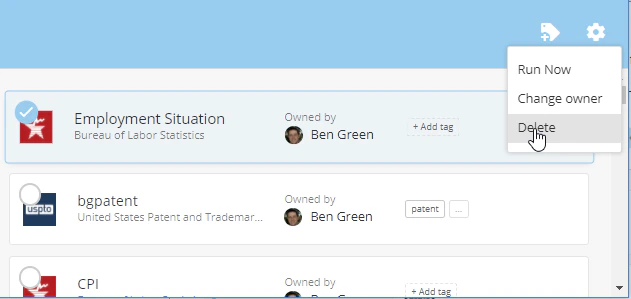
Mouse over the row for the DataSet and click the circled checkmark that pops up over the connector icon.

- In the blue bar that appears at the top of the screen, click the icon.
-
Select Delete.